power cut or power outage activities

Source Code Only $100
Reskin Store Submission? $1,000
Documented   Author Support   14 Days Money Back Guarantee

Screenshots

Demo Video

Description

A power cut happened in the house and for that kids are suffering & facing many problems. Will you help little kids to resolve this problem in this power cut activities game? If yes, you have to go to that place where a short circuit has taken place. In the first scene of power outage activities, you have to visit the farm area & try to fix all the problems with a water pump. In the second view, kids were watching a movie & power cut off so open the projector, check out the problems and try to solve it. After that, a short circuit is happened in the TV so open the television and tries to make the cable connections. At last, kids were studying in the classroom and the projector is shut down so try to fix the problem and run it as before.

Features:

- Check the water pump and try to fix the problems in power cut game
- Try to make the cable connection with different tools
- Help kids by fixing the projector in power outage game
- Easy to play with amazing sounds
- Fix the problem of television and make them happy

Play and enjoy this power cut outage activities new concept of kids educational game and don't forget to share it with your friends.


Step – 1: Import “proj.android-studio” to AndroidStudio.


————————Your Project Configured successfully—————————


Step - 2: make changes for Appname, in-App id and adMob id


2.1 = in AndroidStudio, navigate to your project and you will see app folder,inside that folder there will be a res folder,inside that folder there will be, value folder in that there will be a string.xml file

->open string.xml


->Make changes to fields according to your requirement here


2.2 = For example: your app name is Sky fighter and Currently It is having name “NewGame” in string.xml then

change

<string name="app_name">Your App Name</string>

to

<string name="app_name">Sky fighter</string>


2.3 & 2.4 =

Same As Above Change “admob_id” , “intersttial_id” , “base64_encoded_key”


Step - 3:


3.1 = Change Your Package Name :

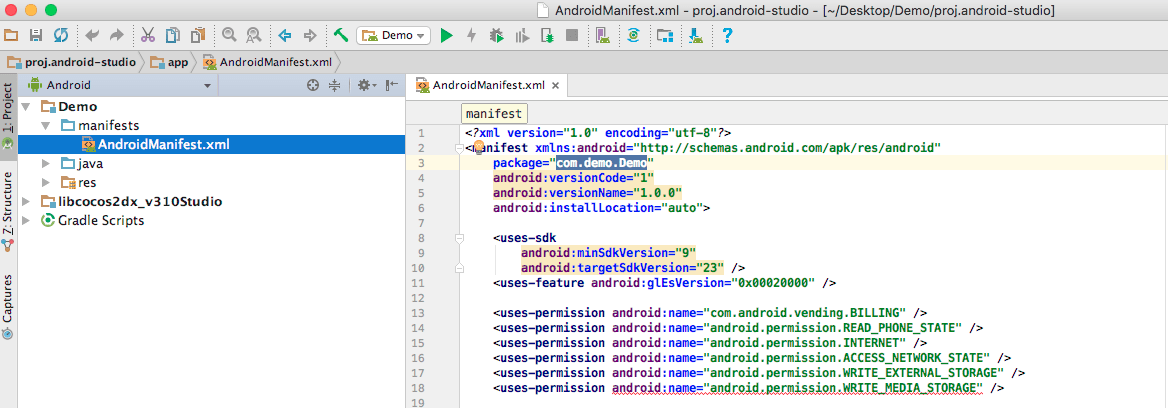
->in AndroidStudio, navigate to your project and you will see AndroidManifest.xml file

change “com.XXX.ZZZ” to You Packagename


3.2 =

AND

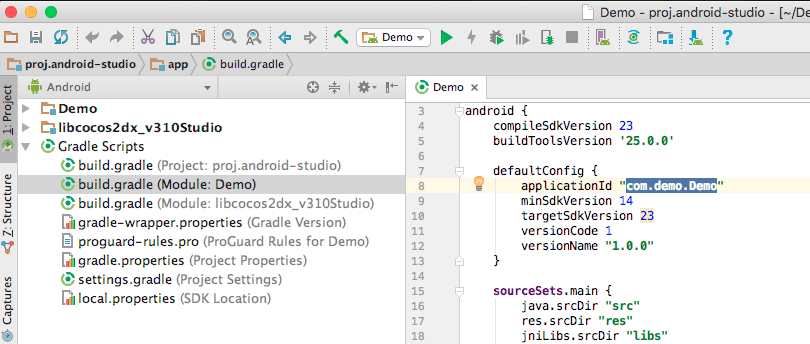
->in AndroidStudio,Below the project Folder there will a other tab named Gradle scripts, click the arrow beside the Cradle Scripts

->open the "build.gradle(Module:withProjectName)"

In that replace your package name with the old one


For example:

change

applicationId "com.XXX.ZZZ"

To

applicationId "Your Packagename"


3.3=

AND

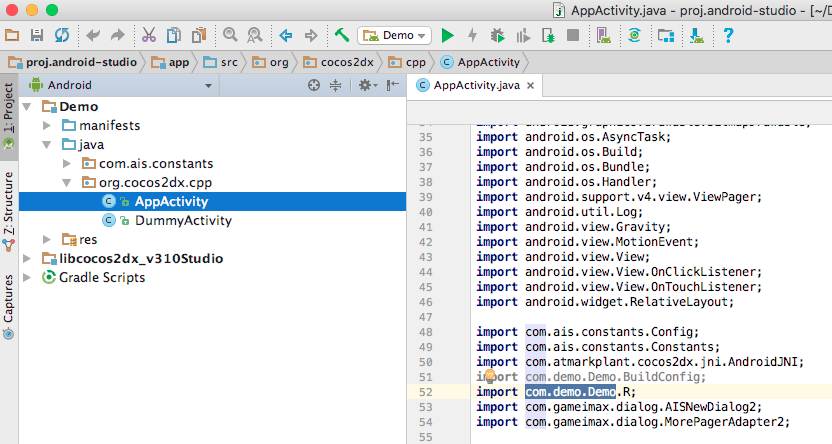
->in AndroidStudio, navigate to your project and you will see “src” folder,inside that folder there will be a “org.cocos2d.cpp” folder,inside that folder there will be a AppActivity file

change “import com.XXX.ZZZ.R;” to You PackageName


You must Login or Register to purchase this item.

Source Code Only
$100

We will send you original source Code with multiple licences - Read More  |  License

$100

Reskin/App Store Submission?
$1,000

Get this App/Game Fully Reskinned(with Source Code) and Published on the App Store. - Read More  |  License

$1,000
  • Author Support
  • 14 Days Money Back Guarantee
Sub Total Price: $100

1941
Views

0
Purchase

0
Comments
about-author
GameiMake(261 Items)
0 out of 5 Rating
View Portfolio
Top